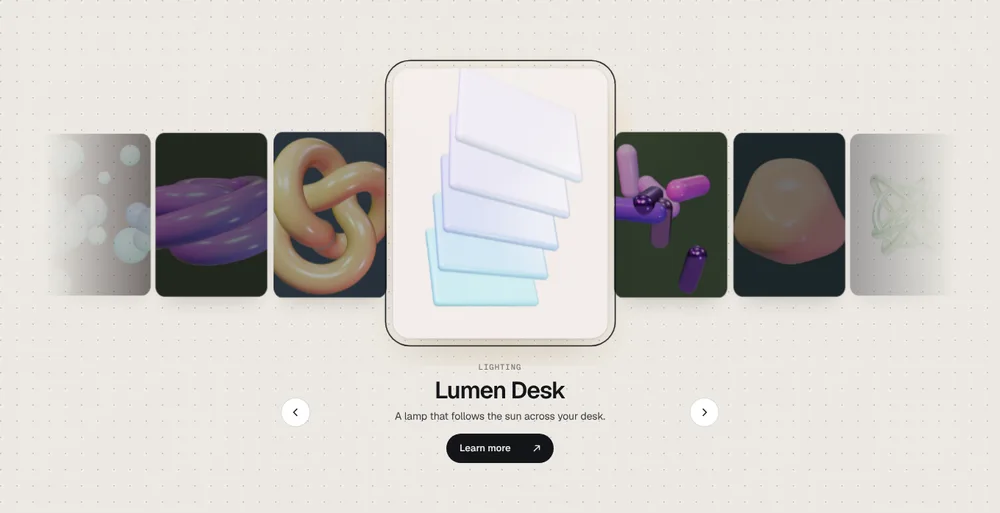
Components / Products
Arc Focus
Cards on an arc with a big focus card, title morph and a details panel.
Install
npm install @effect79/cardverseUsage
<script src="https://cdn.jsdelivr.net/npm/@effect79/cardverse@1/dist/cardverse.min.js"></script>

<e79-arc-focus theme="light">
  <script type="application/json">
    [
      {
        "title": "Soft Geometry",
        "subtitle": "Rounded forms for calm interfaces",
        "tag": "Collection 01",
        "media": "/img/img/g0.webp",
        "detail": "Twelve shapes built from one radius rule, tuned for touch and for print.",
        "link": "/your/page"
      },
      {
        "title": "Low Tide",
        "subtitle": "Cool tones, slow motion",
        "tag": "Collection 02",
        "media": "/img/img/g9.webp",
        "detail": "A palette pulled from early-morning water: grey-blue, salt, wet stone.",
        "link": "/your/page"
      }
    ]
  </script>
</e79-arc-focus>import { ArcFocus } from '@effect79/cardverse/react';
const items = [
{
"title": "Soft Geometry",
"subtitle": "Rounded forms for calm interfaces",
"tag": "Collection 01",
"media": "/img/img/g0.webp",
"detail": "Twelve shapes built from one radius rule, tuned for touch and for print.",
"link": "/your/page"
},
{
"title": "Low Tide",
"subtitle": "Cool tones, slow motion",
"tag": "Collection 02",
"media": "/img/img/g9.webp",
"detail": "A palette pulled from early-morning water: grey-blue, salt, wet stone.",
"link": "/your/page"
}
];
export default function Section() {
return <ArcFocus theme="light" items={items} config={{ /* from the Studio */ }} />;
}// app/page.jsx — a Server Component can render it; the wrapper is a client component
import '@effect79/cardverse/fonts.css'; // once, e.g. in app/layout.jsx
import { ArcFocus } from '@effect79/cardverse/react';
const items = [
{
"title": "Soft Geometry",
"subtitle": "Rounded forms for calm interfaces",
"tag": "Collection 01",
"media": "/img/img/g0.webp",
"detail": "Twelve shapes built from one radius rule, tuned for touch and for print.",
"link": "/your/page"
},
{
"title": "Low Tide",
"subtitle": "Cool tones, slow motion",
"tag": "Collection 02",
"media": "/img/img/g9.webp",
"detail": "A palette pulled from early-morning water: grey-blue, salt, wet stone.",
"link": "/your/page"
}
];
export default function Page() {
return <ArcFocus theme="light" items={items} />;
}<script setup>
import '@effect79/cardverse'; // registers <e79-arc-focus> (once, anywhere in your app)
const items = [
{
"title": "Soft Geometry",
"subtitle": "Rounded forms for calm interfaces",
"tag": "Collection 01",
"media": "/img/img/g0.webp",
"detail": "Twelve shapes built from one radius rule, tuned for touch and for print.",
"link": "/your/page"
},
{
"title": "Low Tide",
"subtitle": "Cool tones, slow motion",
"tag": "Collection 02",
"media": "/img/img/g9.webp",
"detail": "A palette pulled from early-morning water: grey-blue, salt, wet stone.",
"link": "/your/page"
}
];
const config = {}; // from the Studio
</script>
<template>
<e79-arc-focus theme="light" :items.prop="items" :config.prop="config" />
</template>// vite.config.js — tell Vue that <e79-…> tags are web components
import { defineConfig } from 'vite';
import vue from '@vitejs/plugin-vue';
export default defineConfig({
plugins: [vue({ template: { compilerOptions: { isCustomElement: (tag) => tag.startsWith('e79-') } } })],
});// nuxt.config.ts — then use the same tag inside <ClientOnly> … </ClientOnly>
export default defineNuxtConfig({
vue: { compilerOptions: { isCustomElement: (tag) => tag.startsWith('e79-') } },
});
// plugins/cardverse.client.ts
import '@effect79/cardverse';
export default defineNuxtPlugin(() => {});<script setup>
const items = [
{
"title": "Soft Geometry",
"subtitle": "Rounded forms for calm interfaces",
"tag": "Collection 01",
"media": "/img/img/g0.webp",
"detail": "Twelve shapes built from one radius rule, tuned for touch and for print.",
"link": "/your/page"
},
{
"title": "Low Tide",
"subtitle": "Cool tones, slow motion",
"tag": "Collection 02",
"media": "/img/img/g9.webp",
"detail": "A palette pulled from early-morning water: grey-blue, salt, wet stone.",
"link": "/your/page"
}
];
const config = {}; // from the Studio
</script>
<template>
<e79-arc-focus theme="light" :items.prop="items" :config.prop="config" />
</template><script>
import '@effect79/cardverse'; // registers <e79-arc-focus>
const items = [
{
"title": "Soft Geometry",
"subtitle": "Rounded forms for calm interfaces",
"tag": "Collection 01",
"media": "/img/img/g0.webp",
"detail": "Twelve shapes built from one radius rule, tuned for touch and for print.",
"link": "/your/page"
},
{
"title": "Low Tide",
"subtitle": "Cool tones, slow motion",
"tag": "Collection 02",
"media": "/img/img/g9.webp",
"detail": "A palette pulled from early-morning water: grey-blue, salt, wet stone.",
"link": "/your/page"
}
];
const config = {}; // from the Studio
</script>
<e79-arc-focus theme="light" {items} {config}></e79-arc-focus>import { Component, CUSTOM_ELEMENTS_SCHEMA } from '@angular/core';
import '@effect79/cardverse'; // registers <e79-arc-focus>
@Component({
selector: 'app-root',
standalone: true,
schemas: [CUSTOM_ELEMENTS_SCHEMA], // lets Angular accept <e79-…> tags
template: `<e79-arc-focus theme="light" [items]="items" [config]="config"></e79-arc-focus>`,
})
export class AppComponent {
items = [
{
"title": "Soft Geometry",
"subtitle": "Rounded forms for calm interfaces",
"tag": "Collection 01",
"media": "/img/img/g0.webp",
"detail": "Twelve shapes built from one radius rule, tuned for touch and for print.",
"link": "/your/page"
},
{
"title": "Low Tide",
"subtitle": "Cool tones, slow motion",
"tag": "Collection 02",
"media": "/img/img/g9.webp",
"detail": "A palette pulled from early-morning water: grey-blue, salt, wet stone.",
"link": "/your/page"
}
];
config = {}; // from the Studio
}---
const items = [
{
"title": "Soft Geometry",
"subtitle": "Rounded forms for calm interfaces",
"tag": "Collection 01",
"media": "/img/img/g0.webp",
"detail": "Twelve shapes built from one radius rule, tuned for touch and for print.",
"link": "/your/page"
},
{
"title": "Low Tide",
"subtitle": "Cool tones, slow motion",
"tag": "Collection 02",
"media": "/img/img/g9.webp",
"detail": "A palette pulled from early-morning water: grey-blue, salt, wet stone.",
"link": "/your/page"
}
];
const config = {}; // from the Studio
---
<e79-arc-focus theme="light" config={JSON.stringify(config)}>
<script type="application/json" is:inline set:html={JSON.stringify(items)}></script>
</e79-arc-focus>
<script>
import '@effect79/cardverse'; // registers <e79-arc-focus> in the browser
</script>WordPress, Webflow, Shopify, Framer, Wix: use the HTML tab in a custom-code / embed block. More in the Docs.
Set the look visually: open Arc Focus in the Studio, change anything, then Copy code. Only changed settings are exported.
Content
A list of rows in the tag's JSON <script>, the items property, or src="content.json". Rows missing a required field are skipped, never break the page; an empty list shows a friendly placeholder.
| Field | Required | What it does |
|---|---|---|
title | yes | Title. |
subtitle | no | Subtitle. |
tag | no | Label. |
media | no | Image. |
detail | no | Text for the details panel. |
link | no | Where the card's call to action goes: /page, https://…, mailto:…. Unsafe URLs are dropped. |
target | no | _blank opens in a new tab. |
cta | no | Button text (a sensible default otherwise). |
video | no | mp4/webm that plays while the card is in focus. Never with reduced motion. |
poster | no | First frame for the video. |
Links & video
Give a row a link and its call to action goes there (on this demo, links point to this section). Add target: "_blank" for a new tab and cta for the button text. Without a link the call to action is hidden — never a button that does nothing. A video (mp4/webm) plays muted and looping while that card is in focus, open or hovered, and never with reduced motion.
Photos that fit every card. Add focus: "30% 20%" to keep a face or product in view when the card crops the photo, and mediaTall (plus videoTall) for a portrait version: each card shows the picture made for its shape, the way streaming apps do. More.
Settings
Pass only what you change, as JSON in the config attribute or the config prop. Every value is validated and clamped.
| Key | Setting | Default | Range / options |
|---|---|---|---|
| Arc | |||
radius | Radius | 860 | 300 – 1800 px |
spacing | Spacing | 12.5 | 6 – 30 ° |
lift | Active lift | 38 | 0 – 100 px |
reach | Visible each side | 4 | 1 – 6 |
| Cards | |||
cardWidth | Width | 168 | 110 – 260 px |
cardRatio | Height ratio | 1.3 | 1 – 1.7 |
cardRadius | Corner radius | 20 | 0 – 36 px |
activeScale | Active scale | 1.34 | 1 – 1.7 |
inactiveScale | Inactive scale | 0.84 | 0.5 – 1 |
inactiveOpacity | Inactive opacity | 0.92 | 0.2 – 1 |
| Details | |||
openScale | Open scaleSize of the card when Details is open. | 1.62 | 1.1 – 2 |
showControls | Arrows & counter | true | true / false |
| Behaviour | |||
loop | Loop | true | true / false |
autoplay | AutoplayAdvances while nobody is interacting. | false | true / false |
interval | Interval | 3.2 | 1.5 – 8 s |
| Thickness | |||
thickness | ThicknessReal card depth — you see the edge when cards turn. | 8 | 0 – 20 px |
edgeShade | Edge shadeHow much darker the edge is than the card. | 0.5 | 0 – 1 |
| Motion | |||
response | SpeedTime a move takes to settle. | 0.58 | 0.18 – 1.4 s |
bounce | BounceOvershoot when a card snaps into place. | 0.14 | 0 – 0.6 |
sensitivity | Drag sensitivity | 1 | 0.3 – 2.5 |
momentum | MomentumHow far a flick carries. | 1 | 0 – 2 |
Theming
theme="light" | "dark" | "auto". Override tokens on the element, e.g. e79-arc-focus { --accent: #ff5a36; --bg: #0b0b0f; --e79-font: 'Inter' }. Methods: el.replay(), el.pin('state'). States: idle open.